नोट: नीचे दी गई प्रक्रिया सामान्य DMRC WhatsApp QR Ticket सेवा पर आधारित है। DMRC समय-समय पर प्रक्रिया बदल सकता है, इसलिए अंतिम सत्यापन आधिकारिक स्रोत से करें।
🚇 Delhi Metro WhatsApp Ticket Booking – Complete Guide (2026)
Book Delhi Metro QR Ticket on WhatsApp – Step-by-Step Guide, Benefits, Payment, Validity & FAQ
Skip long queues at metro stations and book your Delhi Metro QR Ticket directly through WhatsApp in just a few minutes. This guide explains everything you need to know, including the booking process, payment options, QR ticket usage, validity, important tips, and frequently asked questions.
📌 What is Delhi Metro WhatsApp Ticket Booking?
Delhi Metro WhatsApp Ticket Booking is a convenient digital service that allows passengers to purchase metro QR tickets using WhatsApp. After successful payment, a QR Code ticket is delivered instantly in the WhatsApp chat, which can be scanned at the Automatic Fare Collection (AFC) gates for entry and exit.
✔ Key Highlights
- 📱 No separate app required
- 🎫 Instant QR Ticket
- 💳 Secure digital payment
- 🚇 Contactless travel
- ⏱ Saves time at ticket counters
- 🌱 Paperless and eco-friendly
📱 Official WhatsApp Booking
| Service | Details |
|---|---|
| Booking Method | WhatsApp Chatbot |
| Ticket Type | QR Code Ticket |
| Payment | UPI, Debit Card, Credit Card |
| Delivery | Instant on WhatsApp |
| App Required | No |
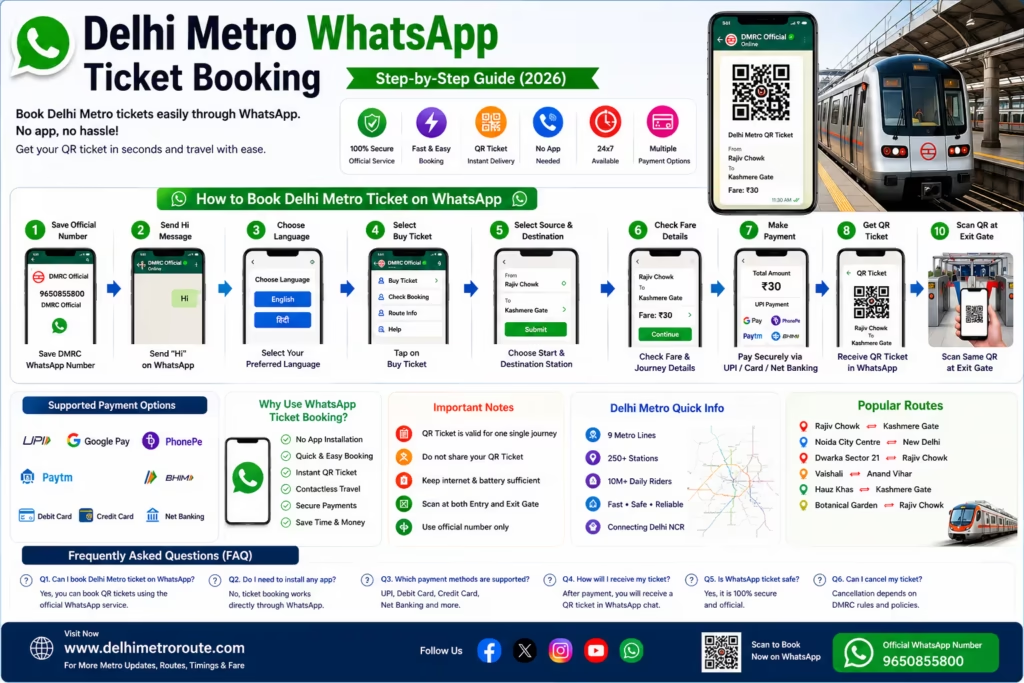
📝 Step-by-Step Booking Process
1️⃣ Open WhatsApp
Open WhatsApp on your mobile phone.
2️⃣ Start Official Chat
Open the official Delhi Metro WhatsApp booking chat (refer to the official DMRC website for the latest contact details).
3️⃣ Send “Hi”
Type
Hi
and send it.
The chatbot will display available services.
4️⃣ Select Language
Choose your preferred language.
✅ English
or
✅ हिन्दी
5️⃣ Select Ticket Booking
Choose
Book Metro Ticket
or
QR Ticket Booking
(depending on the options currently provided by the chatbot).
6️⃣ Choose Source Station
Example
- Rajiv Chowk
- Kashmere Gate
- New Delhi
- Hauz Khas
7️⃣ Choose Destination Station
Select your destination station.
8️⃣ Select Number of Passengers
Choose the number of passengers travelling.
9️⃣ Verify Journey Details
Review all information carefully.
✔ Source Station
✔ Destination Station
✔ Fare
✔ Passenger Count
🔟 Make Secure Payment
Available payment methods may include:
- UPI
- Google Pay
- PhonePe
- BHIM
- Credit Card
- Debit Card
✅ Receive QR Ticket
After successful payment,
your QR Ticket is generated instantly inside WhatsApp.
No printing is required.
🎫 How to Use QR Ticket
At Entry Gate
- Open WhatsApp.
- Open your QR Ticket.
- Scan QR at the AFC gate.
- Gate opens automatically.
At Exit Gate
Repeat the same process using the same QR Ticket.
💳 Payment Methods
Supported payment options may include:
- UPI
- Google Pay
- PhonePe
- Paytm UPI
- BHIM
- Visa Card
- MasterCard
- RuPay Card
Availability may change based on the payment gateway.
⏳ Ticket Validity
Your QR Ticket remains valid according to the conditions shown during booking.
Please complete your journey within the applicable validity period.
⭐ Benefits
✅ No standing in ticket queues
✅ Instant ticket delivery
✅ Secure digital payment
✅ Contactless journey
✅ No paper ticket
✅ Easy cancellation (where applicable)
✅ Fast and convenient
⚠ Important Tips
- Keep your mobile phone charged.
- Ensure internet connectivity while booking.
- Increase screen brightness while scanning QR.
- Do not delete the ticket before completing your journey.
- Verify source and destination before payment.
🚫 Common Mistakes to Avoid
❌ Selecting the wrong destination
❌ Closing WhatsApp before ticket generation
❌ Low screen brightness during scanning
❌ Poor internet connection while payment is processing
❌ Deleting the QR Ticket before exiting the metro
❓ Frequently Asked Questions (FAQ)
Can I book Delhi Metro tickets on WhatsApp?
Yes. Delhi Metro provides an official WhatsApp-based ticket booking service for eligible routes and passengers.
Is any app required?
No.
Only WhatsApp is required.
Will I receive a QR Ticket?
Yes.
The ticket is delivered instantly after successful payment.
Can I pay using UPI?
Yes.
UPI is generally supported along with other digital payment options.
Is printing required?
No.
Simply show the QR Ticket on your phone.
Can I book multiple tickets?
Depending on the current service rules, multiple passenger bookings may be available.
What if payment fails?
If payment fails, wait for confirmation from the payment provider. If money is deducted but the ticket is not generated, contact the official customer support channels.
📌 Travel Tips
✔ Book your ticket before reaching the station.
✔ Keep your QR Ticket ready before arriving at the AFC gate.
✔ Travel during non-peak hours for a smoother experience.
✔ Always follow Delhi Metro passenger rules.
🔗 Related Pages
- Delhi Metro Route Finder
- Delhi Metro Fare Calculator
- Delhi Metro Smart Card Guide
- Delhi Metro Tourist Card
- Delhi Metro First & Last Train Timings
- Delhi Metro Station List
- Delhi Metro Parking
- Delhi Metro Locker Facility
📚 Sources & References
The information provided on this page has been compiled from publicly available and reliable sources for the convenience of passengers.
- Official Delhi Metro Rail Corporation (DMRC)
- Official DMRC Passenger Information
- Official Delhi Metro QR Ticket Information
- Official Delhi Metro Travel Guidelines
- Official Delhi Metro Digital Ticketing Resources
We recommend verifying the latest booking process, payment options, and travel rules through the official DMRC channels before your journey, as these may change over time.
⚖ Disclaimer
delhimetroroute.com is an independent informational website and is not affiliated with, endorsed by, or operated by Delhi Metro Rail Corporation (DMRC).
All trademarks, logos, and brand names belong to their respective owners. While every effort is made to keep the information accurate and up to date, ticket prices, booking methods, policies, and metro services may change without prior notice. Passengers should always verify the latest information through the official DMRC website or official communication channels before travelling.